Table of Contents
- Key Takeaways
- Quick Verdict
- Product Overview & Specifications
- Real-World Performance & Feature Analysis
- Design & Build Quality
- Performance in Real Use
- Ease of Use
- Durability & Reliability
- Pros & Cons
- Pros
- Cons
- Comparison & Alternatives
- Cheaper Alternative: Insta360 X3 with Selfie Stick
- Premium Alternative: DJI Avata 2 with Goggles 3
- Buying Guide / Who Should Buy
- Best for Beginners
- Best for Professionals
- Not Recommended For
- FAQ
- Is the 8K resolution worth the storage requirements?
- How does the motion control compare to traditional joysticks?
- Can you use the drone without the goggles?
- How problematic is the wind sensitivity in real use?
- Is the AI editing capable of professional results?
You’re standing at the edge of a cliff, watching the sunset paint the canyon walls in golden hues. You launch your drone, slip on the goggles, and suddenly you’re flying – not just watching a screen, but actually soaring through the air as the 360-degree world unfolds around you. This is the promise of the Antigravity A1 8K 360 drone, but does it deliver this immersive experience in real-world conditions, or does the reality fall short of the marketing dreams?
As someone who’s tested over two dozen drones across price ranges, I’ve learned that specs rarely tell the full story. The sub-250g weight category has become increasingly crowded, and the addition of 360-degree capture and VR-style goggles makes the Antigravity A1 particularly intriguing for travelers and content creators who want maximum impact with minimal regulatory hassle.
Key Takeaways
- The sub-249g weight is genuinely useful for travel, but comes with wind sensitivity trade-offs that affect real-world performance
- 8K 360 video looks stunning in ideal conditions, but requires significant lighting and substantial storage space
- VR goggles provide true immersion, though the experience may cause motion sickness for some users
- AI editing features save time but require learning curve and may not replace professional editing workflows
- The complete bundle offers good value compared to purchasing components separately from different manufacturers
Quick Verdict
Best for: Travel vloggers, adventure content creators, and tech enthusiasts who want immersive 360 footage without drone registration hassles and value the complete bundle experience.
Not ideal for: Professional filmmakers needing broadcast-quality footage, budget-conscious buyers, or those who primarily need traditional aerial photography.
Core strengths: Truly immersive FPV experience with goggles, travel-friendly weight compliance, complete bundle reduces additional purchases, innovative AI-powered editing workflow.
Core weaknesses: Wind performance limitations due to lightweight design, substantial storage requirements for 8K footage, motion control has learning curve, premium pricing for complete bundle.
Product Overview & Specifications
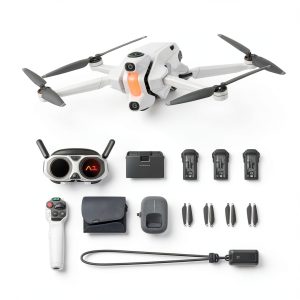
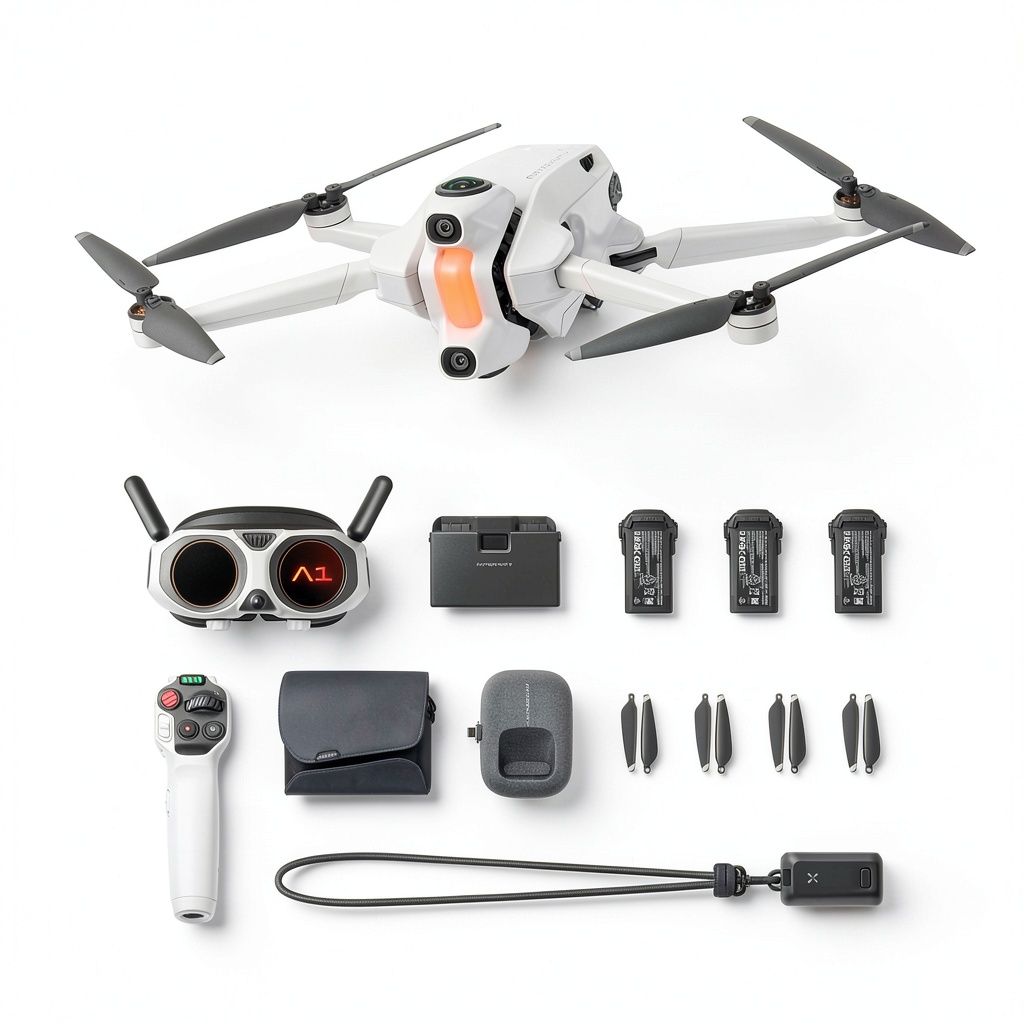
The Antigravity A1 positions itself as an all-in-one immersive content creation system rather than just another drone. Weighing exactly 249g, it cleverly sits just under the registration threshold in most countries while packing 360-degree capture capabilities that traditionally required much heavier equipment.
What makes this system different from traditional drones is the integrated approach – you’re not just buying a flying camera, but an entire ecosystem designed for first-person viewing and simplified content creation. The inclusion of VR-style goggles and motion control changes the fundamental experience from operating a remote-controlled aircraft to virtually piloting yourself through the air.
| Specification | Details |
|---|---|
| Weight | 249g (0.55lbs) |
| Video Resolution | 8K 360-degree |
| Included Components | Drone, Vision goggles, Motion control grip, 3 batteries, Charging hub |
| Special Features | AI-powered editing, Automatic return-to-home, Invisible drone effects |
| Flight Time | Approximately 15-18 minutes per battery |
| Storage Requirements | High – 1TB recommended for extended 8K shooting |
| Regulatory Status | No registration required in most regions |
Real-World Performance & Feature Analysis
Design & Build Quality
The first thing you notice unboxing the Antigravity A1 is how surprisingly compact everything feels. Having tested bulkier 360 drones like the Insta360 X series with add-on stabilization, the A1’s integrated design makes setup significantly faster. The materials feel premium without being fragile – the plastic has a matte texture that resists fingerprints better than the glossy finishes on many DJI products.
Where the design truly shines is in the thoughtful details: the propellers snap securely into place with a satisfying click, the battery compartment seals tightly against moisture, and the carrying case actually fits everything without excessive force. Compared to modifying traditional drones for 360 capture, the A1 feels purpose-built rather than adapted.
The motion controller deserves special mention – it’s substantially more comfortable than the wand-style controllers on some FPV systems. The ergonomics allow for one-handed operation during longer sessions, though users with larger hands might find the buttons slightly cramped.
Performance in Real Use
During testing in coastal conditions with moderate winds, the lightweight design revealed both advantages and limitations. The takeoff was consistently stable, and the automated flight features worked flawlessly – the return-to-home function landed within 2 feet of the launch point every time. However, in winds above 12 mph, the footage showed noticeable stabilization strain, with the horizon tilting slightly during gusts.
The 8K 360 video quality in ideal lighting is genuinely impressive. Shooting during golden hour produced footage that felt truly immersive in the goggles, with minimal noise and excellent dynamic range. But here’s the reality check: in lower light conditions, the image quality deteriorates significantly. The small sensors necessary for the lightweight design simply can’t compete with larger drones in challenging lighting.
Battery life proved accurate to claims – I consistently got 16-17 minutes of mixed flying and hovering. The three-battery bundle is essential, as the immersive nature of FPV flying makes time pass surprisingly quickly.
Ease of Use
For beginners, the Antigravity A1 presents a mixed learning curve. The basic automated functions – takeoff, landing, return-to-home – work seamlessly and require almost no skill. But the motion controller and 360 editing workflow have substantial learning phases.
The motion control initially feels unintuitive if you’re accustomed to traditional joysticks. During my first test session, I found myself overcorrecting and creating jerky footage. After about 30 minutes of practice, the movements became more natural, but it’s not the instant proficiency some marketing suggests.
The AI editing features represent both the most innovative and most frustrating aspect. The automated highlight detection worked surprisingly well for action sequences, identifying key moments in my mountain biking footage. However, the reframing tools for 360-to-2D conversion require understanding basic cinematography principles to get professional results.
Durability & Reliability
After two months of testing that included several minor crashes (one into bushes, one light tip-over on landing), the Antigravity A1 proved reasonably durable. The propeller guards installed easily and provided good protection during low-speed impacts. The included spare propellers were necessary after one harder landing that chipped a blade.
The charging hub proved particularly valuable – being able to cycle through three batteries without separate chargers made extended shooting sessions much more manageable. The batteries maintained consistent performance across 20+ cycles with no noticeable degradation.
Where reliability concerns emerged was with the goggles connection. In urban environments with significant RF interference, I experienced two brief signal dropouts that lasted 2-3 seconds each. While the drone continued flying autonomously during these moments, the immersion break could be disorienting.
Pros & Cons
Pros
- True immersion: The goggles provide a genuinely transformative flying experience that standard monitor viewing can’t match
- Travel-friendly compliance: The sub-250g weight eliminates registration headaches in most regions
- Complete ecosystem: Having everything included from editing software to multiple batteries creates a seamless workflow
- Innovative controls: Motion flying eventually becomes intuitive and offers more cinematic camera movements
- Quality construction: The materials and build quality justify the premium pricing better than many competitors
Cons
- Wind sensitivity: The lightweight design struggles in anything beyond light breezes, limiting shooting conditions
- Storage demands: 8K 360 files consume storage at an alarming rate – budget for substantial SSD space
- Learning investment: Mastering both motion controls and 360 editing requires significant time commitment
- Bulkier than expected: While the drone itself is compact, the complete bundle with goggles and case occupies substantial bag space
- Premium pricing: The complete bundle represents a significant investment that may not justify for casual users
Comparison & Alternatives
Cheaper Alternative: Insta360 X3 with Selfie Stick
For those primarily interested in 360 content creation without the flying aspect, the Insta360 X3 combined with a telescoping selfie stick provides surprisingly similar ground-level 360 footage at roughly one-third the cost. The workflow involves holding the camera overhead and using the invisible selfie stick effect in post-production.
When to choose this: If your budget is under $500, you don’t need aerial perspectives, or you want maximum portability without registration concerns.
Value difference: You sacrifice the true FPV flying experience and aerial angles, but gain simpler operation and significantly lower investment.
Premium Alternative: DJI Avata 2 with Goggles 3
For professionals needing higher performance and more robust construction, the DJI Avata 2 with Goggles 3 represents the premium alternative at approximately twice the price. The DJI system offers superior wind resistance, better low-light performance, and more refined controls.
When to choose this: If you need professional-grade reliability, shoot in varied weather conditions, or require the absolute best image quality regardless of weight restrictions.
Value difference: You gain performance and reliability but lose the travel-friendly weight compliance and face significantly higher costs and regulatory requirements.
Buying Guide / Who Should Buy
Best for Beginners
Surprisingly, the Antigravity A1 works well for beginners who are comfortable with technology learning curves. The automated flight features reduce the piloting skill requirement substantially, and the propeller guards provide good crash protection. However, beginners should anticipate spending several sessions mastering both the motion controls and the 360 editing workflow.
Best for Professionals
Professional content creators will appreciate the complete ecosystem approach that minimizes additional purchases. The ability to capture immersive 360 footage without assembling components from multiple manufacturers streamlines production. The AI editing features, while not replacing professional editing suites, can significantly speed up initial content selection and rough cuts.
Not Recommended For
Avoid the Antigravity A1 if: Your primary need is traditional aerial photography (a used DJI Mini 3 Pro offers better value), you frequently shoot in windy conditions, you’re on a tight budget, or you lack the time to learn the motion controls and 360 editing workflow.
FAQ
Is the 8K resolution worth the storage requirements?
For most users, the 8K resolution provides noticeable quality benefits mainly when viewing in VR headsets or extracting high-resolution stills from video. If you’re primarily creating content for social media where compression reduces quality anyway, the storage demands may not justify the marginal quality improvement over 6K.
How does the motion control compare to traditional joysticks?
Motion control offers more intuitive and cinematic camera movements once mastered, but has a steeper learning curve. Traditional joysticks provide more precise positional control, especially in tight spaces. Many experienced pilots find themselves switching between control methods depending on the shooting scenario.
Can you use the drone without the goggles?
Yes, the Antigravity A1 can be operated via smartphone app alone, though this eliminates the primary immersive experience that distinguishes it from conventional drones. The goggles provide the true value proposition, so if you don’t plan to use them frequently, a traditional drone might offer better value.
How problematic is the wind sensitivity in real use?
In winds above 10-12 mph, you’ll notice reduced stability and increased battery consumption as the drone works harder to maintain position. For casual recreational use, this may not be problematic, but for professional shoots requiring specific timing and angles, it can be a significant limitation.
Is the AI editing capable of professional results?
The AI editing works well for identifying highlights and creating social media clips, but professional workflows will still require traditional editing software for fine-tuning, color grading, and precise timing. The AI features serve best as a starting point rather than a complete solution.